

Why batching works
Switching between tasks is expensive. Writing a post for a dental practice, then answering a client email, then finding an image for a gym, then writing again for the dental practice means warming up four times. Each switch costs a few minutes of getting back into the right voice and the right tool. Across ten clients and five days, those minutes become hours.
Batching groups similar work so you warm up once. It also makes the week predictable. Clients know when to expect drafts, reviewers know when to block time, and nothing depends on remembering to post at 4 pm on a Thursday.
The trade-off is that a batch has to be planned before it starts. A batch without a plan is just a long afternoon of guessing.
Before the first batch: set each client up once
The work that makes batching possible happens before the first week. For each client, write down the things you would otherwise rediscover every time you sit down to write:
- Channels and volume. Which channels the client is on, and how many posts each needs per week.
- Voice. Who is speaking, how formal they are, and words to use or avoid. Our guide on keeping a consistent brand voice across clients covers how to make this specific enough to check against.
- Topics. The themes the client wants to be known for, and the topics that are off limits.
- Look. Colours, image style and whether the logo appears.
- Posting days. Which days posts usually go out, so drafts can be dated as they are written.
If you are not sure how many posts each client needs, our guide on how many social media posts per client gives a method for choosing a number you can sustain.
A weekly batching routine
The routine below runs on a fixed rhythm. The exact days matter less than keeping them the same every week.
- Plan (30 minutes, once a week). Go through every client and note what is happening next week: launches, events, seasonal hooks, anything the client has asked for. Campaigns that change the tone for a while belong here too.
- Draft (one block). Write every client's posts for the coming week in one pass, client by client. Finish one client's whole week before moving to the next, so you only switch voice once per client.
- Images (one block). Make or choose images for every draft that needs one, again client by client.
- Review (one sitting). Read every draft with fresh eyes, ideally the next morning. Edit, approve or reject. Record why something was rejected, so the same problem does not come back next week.
- Client approval (if needed). Send each client their week in one message, not one post at a time. Our content approval workflow for agencies explains how to keep this from becoming a bottleneck.
- Schedule (one block). Load the approved week into your scheduler, or post it yourself, in one session.
Leave a small gap between drafting and reviewing. Reviewing your own writing straight after finishing it is the least effective review there is.
Batch by client, not by channel
It is tempting to write every LinkedIn post for every client, then every Instagram caption, and so on. It feels efficient because the channel's format stays in your head. In practice the voice is the harder thing to hold, and changing it every few minutes is where quality slips. Write one client's whole week across channels, then move on. The channel formats are easier to switch between than the voices are.
The exception is images. If one tool or one designer produces every image, batching images separately, still grouped by client, is usually faster.
Keep one place for the week
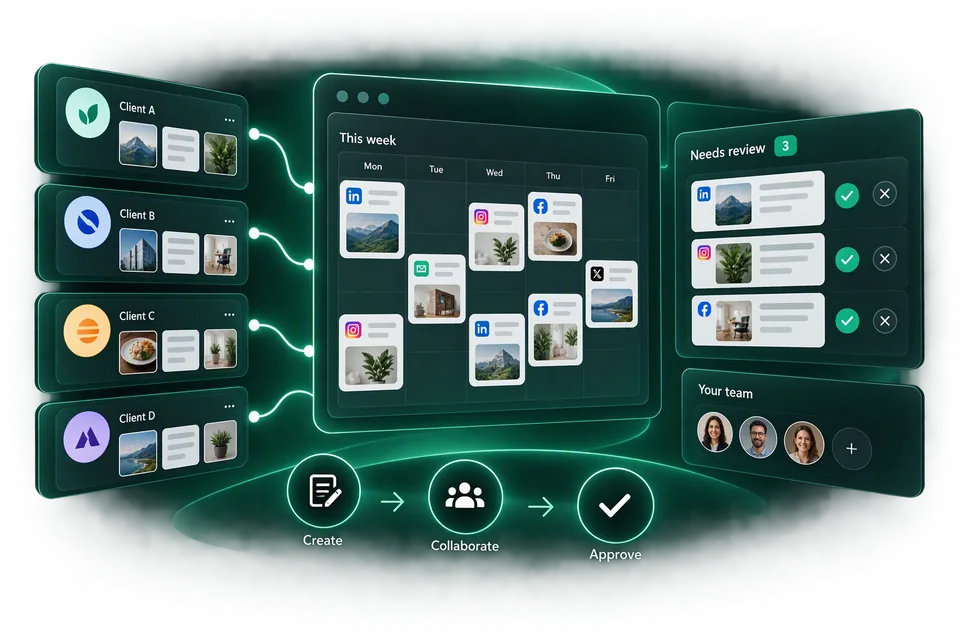
A batch falls apart when the drafts live in five documents, three chat threads and someone's notes app. Keep the whole week in one place where every draft has a status: drafted, in review, approved or rejected. A simple calendar view that shows each client's week, and which posts are approved but not yet dated, catches gaps before the week starts rather than on the day.
Common batching mistakes
- Batching too far ahead. A month of posts written in one go goes stale when the news, the season or the client's priorities change. A week ahead is enough for most clients; two weeks for those with slow approvals.
- No slack for the unexpected. Leave room in each week for one reactive post per client, for the announcement nobody mentioned until Tuesday.
- Reviewing in fragments. Approving posts one at a time between other tasks loses the benefit of batching. Review in one sitting.
- Skipping the reasons. If you reject a draft without noting why, the same mistake turns up next week. A one-line reason is enough.
- Treating the plan as optional. The planning half hour is the step most often dropped and the one the rest depends on.
Where Zentivue fits
Zentivue takes over the drafting and image steps of the routine. You set each client up once with its channels, posts per week, voice, topics, look and posting days. Each week Zentivue prepares every client's drafts before the week begins, ready to review by 6:00 on the day you choose, in the client's time zone. If you need more in the middle of a week, you can generate drafts straight away.
The review step stays with you. Every draft waits in one review queue, where you edit the copy, accept or reject the copy and the image separately, and give a reason when you reject. Zentivue uses those decisions to learn each campaign's preferences, and your own settings always take priority. Approved posts are then copied or downloaded and scheduled in the tool you already use. Our guide on using Zentivue with your scheduler walks through that last step.
Managing many clients on your own? See how Zentivue works for social media managers, or compare plans by number of clients.
A one-page checklist
- Every client has written channels, volume, voice, topics, look and posting days.
- Planning happens at the same time each week, for every client at once.
- Drafting is done client by client, a whole week at a time.
- Review happens in one sitting, with a reason for every rejection.
- Clients approve a week at a time, not a post at a time.
- Scheduling happens in one session, from one place that shows every client's week.
- Each week leaves room for one unplanned post per client.