


AI content for social media managers
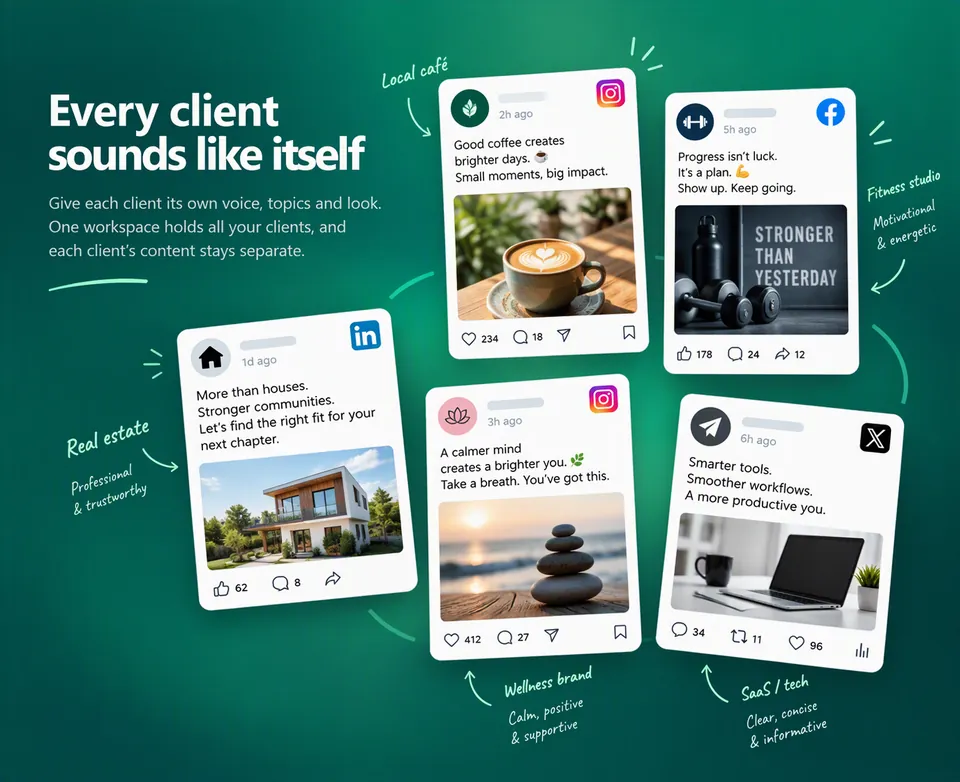
Zentivue is an AI content tool for social media managers who look after several clients at once, whether you freelance or run a small social media business. Each client gets a weekly batch of first drafts for the channels they use, written in that client's own voice, and every draft waits in one queue for you to review.
Many clients, one person, every week
When you manage social media for a roster of clients, the hard part is rarely a single post. It is keeping a café, a dentist and a software company all posting on time, each sounding like itself, while you also find new clients and answer the old ones. Monday turns into a writing marathon, and whichever client is least demanding quietly falls behind.
Zentivue moves the first draft off your plate. You start each week with drafts already written, so your time goes on judgment: checking facts, sharpening the hook, and deciding what is good enough to go out under a client's name.
How it works when you manage multiple clients
- A profile per client. Describe what each client does and who they serve, then set their voice, tone, topics, hashtags, words to use or avoid, and brand colours. Set it once and change it when the client changes.
- Only the channels each client uses. LinkedIn, Facebook, Instagram, X and Reddit posts, marketing emails and blog articles, with a weekly count for each.
- Drafts ready on Monday. Each client's batch is ready to review by Monday morning in that client's time zone, and an email tells you when it is finished.
- Extra drafts on demand. A client announces a sale on Wednesday? Ask for more drafts for that client and channel whenever you need them.
- Campaigns for launches and seasons. Give a promotion its own tone and weekly counts without touching the client's usual settings.
One review queue for every client
All drafts land in a single list you can filter by client, campaign, channel and status, and a calendar shows what is planned for each day. Read a draft, edit it, and accept or reject the copy and the image separately. A rejection carries a reason, and Zentivue learns from those decisions for later drafts. You can work through the queue from a phone as easily as from a desk.
Zentivue never posts anything. You copy or download approved posts and load them into the scheduler or app you already use. See how a week works and the social media post generator for what each channel's draft looks like.
Show clients their content without extra admin
If you switch it on for a client, their main contact gets a short morning email listing what you approved for them, sent in your business's name. It asks nothing of them. Zentivue can also prepare each client's monthly invoice in your name and record whether it was paid; collecting the money stays with you.
How plan sizing fits a client roster
Plans list a number of clients as a sizing guideline based on an average posting amount, not a hard limit. Some clients post more and some less, and it balances out. If a busy month needs more, add a Generation Pack, and any pack credits you don't use carry forward. To estimate your own volume, try the content volume planner, then see how pricing works.
Further reading
Two guides cover the habits that keep multi-client work smooth: a content approval workflow for agencies and how to keep a consistent brand voice across clients. Running a larger team? See Zentivue for agencies.
Questions from social media managers
Can each client sound different?
Yes. Voice, tone, topics and look are set per client, so a law firm's posts do not read like a bakery's. Campaigns can adjust a client's tone for a while without changing their defaults.
Do my clients need an account?
No. Clients don't sign in. If you choose, they can receive preview emails or invoices, and those are sent in your business's name.
Does it replace my scheduler?
No. Zentivue drafts and you approve. You copy or download approved content and publish it where you already do.
What if I add clients during the month?
Add them. The client count on each plan is a guideline, not a limit. If your total posting grows past what your plan was sized for, add a Generation Pack or move to a larger plan.
Start the week with drafts for every client
Set up your first client and review what arrives.
Sign up